LLM Gateway: What It Does, What It Doesn't, and When You Need One
An LLM gateway gives you one control point for model traffic: routing, keys, budgets, logging and fallbacks. It won't make an agent safe on its own. Here's what a gateway actually does, when it's worth adding, and how to decide between building, using open source, or buying.
By Vikas Goel
Every company using AI seriously reaches the same moment. Three teams hold their own API keys, nobody can explain last month's bill, and a provider outage takes down a customer feature.
That's usually when someone says "we need an LLM gateway." They may be right, but it's worth being clear about what one will and won't fix.
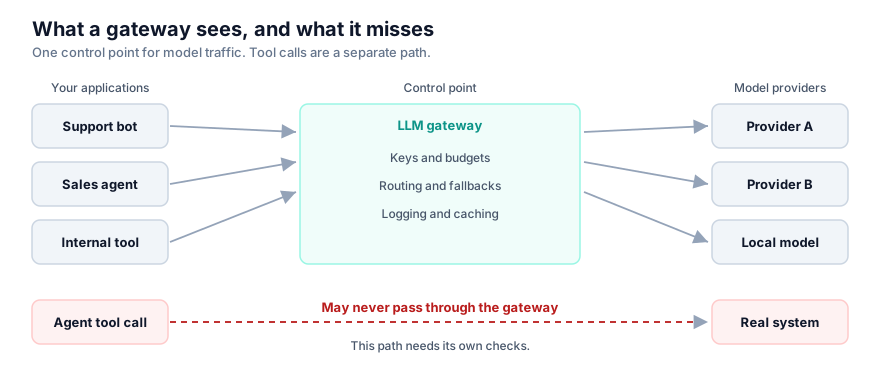
What an LLM gateway does
A gateway sits between your applications and your model providers, giving you one API and one control point.
| Function | The problem it solves |
|---|---|
| Unified API | Changing provider doesn't mean rewriting each application |
| Central keys | Teams stop holding raw provider credentials |
| Budgets and attribution | You can see and cap spending by team or product |
| Routing and fallbacks | Simple work goes to cheaper models, and outages hurt less |
| Logging | One record of what was sent and returned |
| Caching | Repeated work costs less |
What it doesn't do
It won't reduce your largest agent cost by itself. Routing lowers the price per token. If your agent resends its full history at each step, you still have the quadratic cost problem. That gets fixed in the agent's design.
It won't make agents safe by itself. A gateway sees model traffic. The dangerous moment is often the tool call that changes a real system, which may never pass through it. You still need enforcement in the execution path and security limits around the agent.
It can create a new risk. You've concentrated keys and logged prompts in one place, and that data may include customer information. Protect the gateway accordingly, and decide what gets logged and where it is stored.
Do you need one yet?
| Your situation | Decision |
|---|---|
| One application, one provider | Wait. A thin wrapper in your code is enough. |
| Several teams, or spending you can't attribute | Add one. |
| More than one provider, or uptime matters | Add one. |
| Regulated data or strict data boundaries | Add one, and choose where it is deployed first. |
Build, open source or buy
A basic proxy takes very little time to build, which is the trap. Streaming, tool-call differences between providers, new model releases and security updates become permanent work.
Start with an existing option, whether an open-source project such as LiteLLM or a commercial gateway such as Kong or Portkey. Assess them against your own requirements:
- Can it run inside your boundary, if you need that?
- Does it fully support streaming and tool calling for your providers?
- How much latency does it add at the 95th percentile?
- Can you control what gets logged and redact sensitive fields?
- What happens to your traffic when the gateway itself fails?
The last question is the one teams forget. You've added a component that all your AI traffic depends on, so test its failure before production does it for you.
Vikas Goel is the founder of Thinkerwave AITech and a former enterprise CTO. He works with enterprises and founders as a fractional AI CTO and AI advisor.
- LLM Gateway
- AI Infrastructure
- LLM Cost
- AI Governance
- Production AI